About Taxprep Home
Taxprep Home is a landing page that provides an alternative way to manage your tax returns. From this page, you can quickly locate, view and open returns without navigating through individual files. This feature is designed to streamline your workflow and improve efficiency when working with multiple returns.
Content:
Access Taxprep Home
To access Taxprep Home:
-
Open the desired CCH iFirm Taxprep product.
-
Click the Taxprep Home
 icon, located in the top-right corner of the return manager.
 -
The Taxprep Home landing page opens, showing the list of returns.
-
The system retains the last landing page viewed: Return manager or Taxprep Home. On the next launch of CCH iFirm Taxprep, the same landing page will open.
-
To navigate to the return manager, click the
 icon.
icon.
Open client information and returns
-
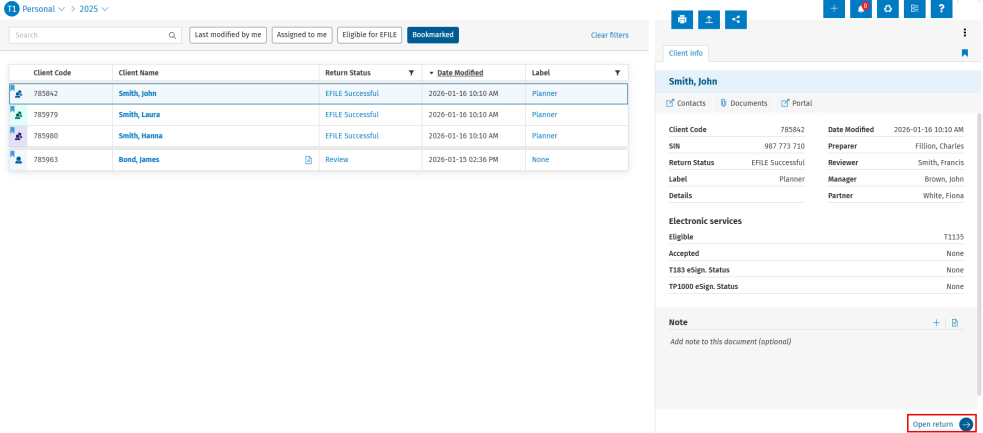
To view client information, click the white space beside the client name.
The Client Info summary will open on the right. -
To open the return from the summary, click Open return.
-
Alternatively, the return can be opened directly by clicking the client name in the list.

Edit client details
To edit details from Taxprep Home:
-
Open the client information by clicking the white space beside the client name.
-
Hover over the detail line to edit and click the
 icon to edit the information.
 -
Click the check mark to save the changes or X to cancel.
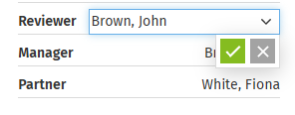
Certain client information can be modified directly from the return list.
Locate the desired client return.
Select the existing information in the applicable column.
Make the necessary changes.
Add or view notes
-
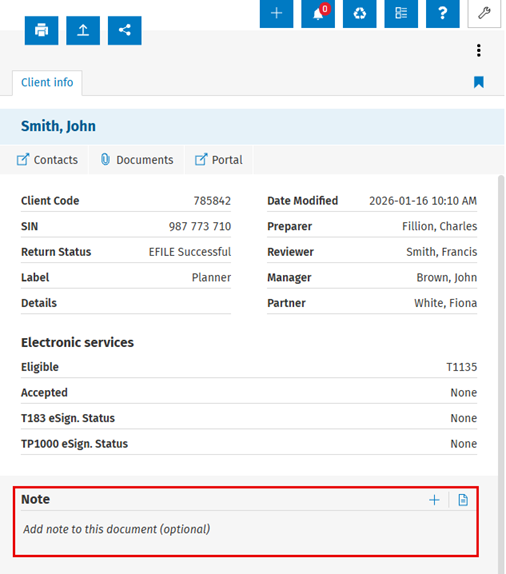
To add a note using the
 icon:
icon:-
Click the
icon. -
Write the note and click the check mark to save it.
-
-
To add a note using the
 icon:
icon:-
Click the
icon. -
Write the note and click Add note to save it.
-
-
To view all notes:
-
Click the
icon to display all existing notes.
-
Access additional information
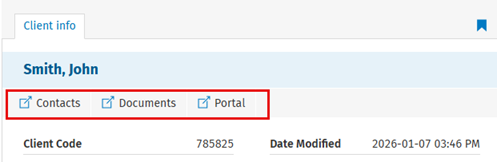
Access to additional CCH iFirm modules depends on assigned security roles and licenses.
-
Ensure the appropriate security roles and licenses are assigned to users.
-
Available modules are displayed under the client name in the right panel.
-
Select a module to view its details.
Other actions available in Taxprep Home
From the landing page, you can:
-
Print returns
-
EFILE returns
-
Publish returns
-
Use the Action
 button