Release Notes - CCH iFirm Taxprep T1 2020 v.1.0 (2020.40.29.01)
Try our Knowledge Base!
Consult our Knowledge Base to quickly find the information you need!
Our Knowledge Base contains an array of articles answering technical and tax questions most frequently asked to Support Centre agents. All you need to do is enter a few key words and the articles display in order of relevance to provide you with valuable information that will accurately answer your questions.
About CCH iFirm Taxprep
Welcome to CCH iFirm Taxprep, the first cloud-based professional tax software in Canada.
CCH iFirm Taxprep runs in your Web browser, with nothing to install on your desktop. Therefore, all updates will be automatically deployed during tax season.
Please note that the product is only supported with the Google Chrome browser.
CCH iFirm Taxprep is bilingual and provides you with:
- Most robust tax calculations of the industry, imported from the Taxprep software programs;
- Comprehensive diagnostics with audit trail of user reviewed diagnostics;
- Ability to navigate through cells with data entered in the year;
- Ability to add review marks and comments;
- Intuitive user interface;
- and many more other features.
If you want to learn about the new non-tax-related features delivered with this new CCH iFirm Taxprep version, consult the Technical Release Notes.
About
This version contains most of the forms released by the Canada Revenue Agency (CRA) and Revenu Québec (RQ) for the 2020 taxation year. These forms were approved by the tax authorities and allow you to file income tax returns for taxpayers who do not require the forms listed in the Calculations and Forms Not Available or Under Review section.
This version of CCH iFirm Taxprep T1 was updated in order to integrate the most recent tax measures pursuant to the 2020 taxation year.
Import or convert preparer profiles, custom letters, print formats and diagnostics
When a new taxation year is added to the application, remember that the prior period Preparer Profile, custom letters, print formats and diagnostics must be imported or converted.
For more information, please consult the following FAQ: https://support.cch.com/canada/solution/000118906/FAQ-Why-is-my-current-Preparer-Profile-empty-since-the-latest-deployment-of-CCH-iFirm-Tax?language=en
Auto-fill T1 return - 2020 Tax Season
Important dates
Federal
February 22, 2021 – The Auto-fill T1 return service opens. The CRA tax data can be downloaded from the RETRIEVE tab.
Auto-fill T1 return – Downloading prior-year data
You can download tax data from the previous four years (2016, 2017, 2018 and 2019). To download data of a given year, you will have to use the CCH iFirm Tax T1 program of the year in question.
Note that only data on slips of prior years will be available; data that does not relate to a specific year, such as carried forward balances, will not be available.
Tax Data Download from Revenu Québec – 2020 Tax Season
Important dates
Québec
February 22, 2021 – The Tax Data Download service opened.
The Revenu Québec tax data can be downloaded with version 2.0 of CCH iFirm Tax T1 2020 from the RETRIEVE tab. To do so, you must hold a valid authorization or a power of attorney (MR-69) with Revenu Québec or have the taxpayer’s download code.
Modifications Made to Version 1.0
Forms, Schedules, and Workcharts Added to the Program
Federal
T1 Line 31350, Digital News Subscription Expenses
A calculation workchart has been created for purposes of computing the tax credit for digital news subscription expenses.
Starting in 2020, this amount is updated to line 31350 of the T1 return.
T185, Electronic Filing of a Pre-authorized Debit Agreement
The CRA introduced Form T185 which replaces former Part C of Form T183. As a result, starting this year, to electronically transmit a pre-authorized debit (PAD) agreement using the program, Form T185 must be completed and signed by the taxpayer prior to the transmission.
T777S, Statement of Employment Expenses for Working at Home Due to COVID-19
Form T777S was received too late to integrate it into this version of the program. Therefore, it will be available in the next version, which is scheduled to be released during the third week of February.
T777S, Statement of Employment Expenses for Working at Home Due to COVID-19
Form T777S is accessible via Form T777. To complete Form T777S, the answer to the question Do you want to complete Form T777S (Statement of employment expenses for working at home due to COVID-19)? must be Yes. Otherwise, the standard Form T777 will be displayed.
In Form T777S the Canada Revenue Agency has introduced a temporary flat rate method to calculate the home office expenses for 2020 for employees who worked from home in 2020 due to COVID-19. If the employee uses this method, their employer is not required to complete Form T2200S, Declaration of Conditions of Employment for Working at Home Due to COVID-19, and the employee is not required to keep documents to support their claim.
If the employee does not use this method, their employer must complete Form T2200S so the employee may use the detailed method of Form T777S and the employee must keep their supporting documents.
The detailed method only applies to taxpayers who are claiming expenses incurred to earn salary or commission income. Form T777S can be completed by taxpayers who have home office expenses related to working at home in 2020 due to COVID-19 and meet all the following conditions:
- The employee worked more than 50% of the time from home for a period of at least a month (four consecutive weeks) in 2020. The period may exceed a month.
- The employee’s employer completed and signed Form T2200S, Declaration of Conditions of Employment for Working at Home Due to COVID-19.
- The employee kept all their supporting documents.
Form T777S does not apply to taxpayers who are claiming employed tradesperson’s and apprentice mechanic’s tools expenses, employees working in forestry operations expenses and employed artists. It does not apply either to taxpayers who are claiming motor vehicle expenses or any capital cost allowance (CCA).
The following list includes common home office expenses. For additional home office expenses that taxpayers can claim, go to canada.ca/cra-home-workspace-expenses.
- rent paid for a house or apartment where the taxpayer lives
- electricity, water, heat or the utilities portion of condominium fees
- maintenance (minor repairs, cleaning supplies, light bulbs, paint, etc.)
- home Internet access fees
- supplies (stationery items, pens, folders, sticky notes, postage, toner, ink cartridge, etc.)
- employment use of a basic cell phone service plan
- long distance calls for employment purposes
Employees who earn commission income can also claim the following:
- property taxes
- home insurance
- lease of a cell phone, computer, laptop, tablet, fax machine, etc. that reasonably relate to earning commission income
T2200S, Declaration of Conditions of Employment for Working at Home Due to COVID-19
There now exists a second version of Form T2200, i.e. Form T2200S. The form is available from Form T2200. To access it, the box Declaration of conditions of employment for working at home during COVID-19 must be selected. Otherwise, the standard Form T2200 will be displayed.
This version of the form is destined to employees who were required to work from their home during COVID-19. The employer must complete and sign this form if the employee chooses to use the detailed method of Form T777S to calculate their home office expenses (work-space-in-the-home and supplies). If the employee is required to pay for expenses other than home office expenses, do not use this form. Instead, complete Form T2200, Declaration of Conditions of Employment.
T1 Line 47555, Canadian journalism labour tax credit
The Canadian journalism labour tax credit (CJLTC) is allocated by a partnership and is shown in box 236 of the T5013 slip. This credit is granted to a member of a qualifying journalism organization that is a partnership. It is available for qualifying labour expenditures incurred for eligible newsroom employees, minus any amount of assistance received by the partnership.
If the individual is a member of a partnership that incurred a qualifying expenditure for 2019, a reassessment can be requested for the 2019 income tax return to claim the CJLTC. The amount claimable will be indicated on a letter given by the partnership. To request a reassessment, you must make an adjustment request using the Represent a client service or Changing a return service in My Account, on the Canada Revenue Agency Web site, or paper file a T1-ADJ form, accompanied by the letter given by the partnership.
Québec
TP-1029.AN.A – Certificate of Ongoing Assistance
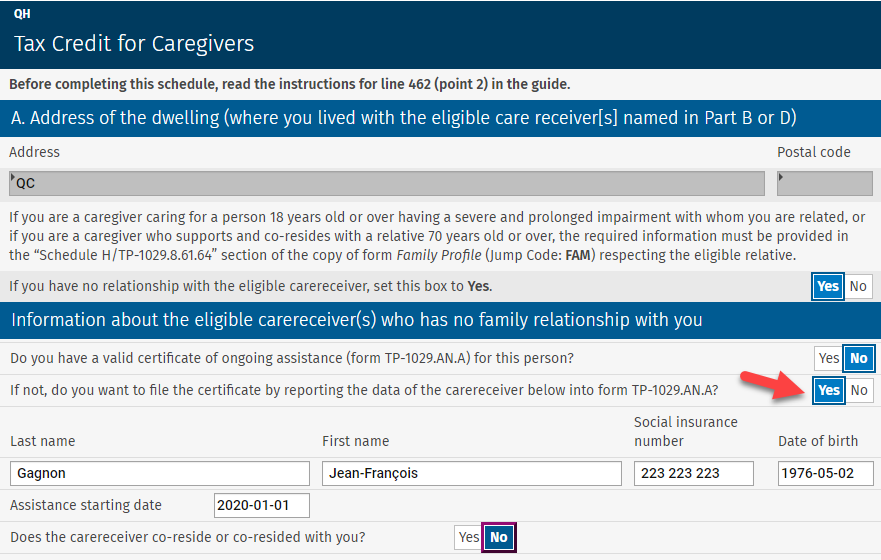
Form TP-1029.AN.A has been added to allow preparers to complete and print this certificate for clients concerned. This new certificate must be filed with Revenu Québec if the taxpayer is eligible for the tax credit for caregivers (Schedule H) for an eligible carereceiver with whom he or she is not related. There are two ways to create a form for each eligible carereceiver:
- In Schedule H, select the box If you have no relationship with the eligible carereceiver, select the following check box: and enter the information about the eligible carereceiver who has no relationship with the caregiver to complete the certificate for this person:
- Access and complete the new Form TP-1029.AN.A.
Updated Forms
Preparer Profiles, T1-ADJ
The fields RepID and EFILE# have been added to the T1-ADJ form.
The EFILE number will be updated to the EFILE# field if that information is entered in the Electronic Services Identification section, which can be accessed from the Settings/Tax menu.
The RepID will be updated to the RepID field if you selected Representative information in the T1-ADJ/Information to enter in the “Authorization” drop-down list in the PROFILE tab of the form.
Note that when this option is selected, the representative information will be that of the AUTORIZATION form for an authorization request transmitted and accepted in the current year. If this is an authorization request accepted in a prior year, the representative information will be that of the AUTHORIZATION FORMS tab of the Preparer Profile.
AUTHORIZATION FORMS tab
The options Transmit for deceased clients and Transmit for clients with regards to which access to the CRA’s Represent a client service has already been given to you have been removed from the AUTHORIZATION – Authorizing a representative section.
Note that for deaths occurring after February 9, 2020, you are no longer required to submit a new authorization request provided you were the authorized representative of the deceased prior to their death.
Client letter – Client Letter Worksheet
The Partner field has been added to the LW form so that it could be used in a custom letter.

Federal
ID, Identification and Other Client Information
When a new e-mail address is entered in the client file and the option Already registered is selected in the CRA online mail section, the user will be prompted to confirm whether the e-mail address should be replaced in the CRA files. This will prevent the e-mail address from being updated by mistake in the CRA files.
Virtual currency
A question has been added to report virtual currency transactions other than those giving rise to a capital gain or loss that must be entered in Section 5 of Schedule 3.
You must answer this question if the taxpayer received or disposed of virtual currency (by selling, transferring, exchanging, giving, etc.) for transactions other than those giving rise to a capital gain or loss.
Canada Emergency Response Benefit (CERB), Canada Recovery Benefit (CRB) and Provincial/Territorial COVID-19 financial assistance payments
To face the COVID-19 pandemic, the different federal and provincial governments paid various benefits to Canadian taxpayers to compensate for the decrease in income as a result of job losses or reductions in income caused by the pandemic.
These benefits are indicated in the T4A slip in which new boxes have been added:
- Box 197, Canada Emergency Response Benefit (CERB);
- Box 198, Canada Emergency Student Benefit (CESB);
- Box 199, Canada Emergency Student Benefit (CESB) for eligible students with; disabilities or those with children or other dependents;
- Box 200, Provincial/Territorial COVID-19 financial assistance payments;
- Box 202, Canada Recovery Benefit (CRB);
- Box 203, Canada Recovery Sickness Benefit (CRSB);
- Box 204, Canada Recovery Caregiving Benefit (CRCB)
For Québec residents, these benefits are shown in the following boxes of the RL-1 slip:
- The amounts received as part of the Incentive program to retain essential workers (IPREW) are shown in box O-5 of the RL-1.
- CERB-related benefits are shown in box O-6 of the RL-1.
- CRB-related benefits are shown in box O-7 of the RL-1.
These benefits are updated to the following lines of the T1 and TP1 returns:
T1 return
All COVID-19-related benefits must be reported on line 13000, Other income.
TP1 return
All CERB- and CRB-related benefits must be reported on line 154, Other income. Code 16 has been added to Form TP1 Line 154 to identify CERB and CRB benefits.
In addition, line 169, CERB, CESB, CRB, CRSB or CRCB, has been added to the TP1 return to compute the different benefits received by the taxpayer.
The amount in box O-5 of the RL-1 slip must be reported on the new line 151, Incentive program to retain essential workers.
T1 lines – Worksheet for the return – Line 30000
A worksheet has been added to calculate the basic personal amount updated to line 30000 of the return. The modifications to the basic personal amount were announced in the Economic and Fiscal Update 2019, published by the Department of Finance Canada on December 16, 2019.
This amount increases to $13,229 in 2020 for taxpayers with a net income equal to or less than $150,473. It is phased out to $12,298 for taxpayers with a net income greater than $150,473 and less than $214,368. For taxpayers with a net income equal to or greater than $214,368, this amount is established at $12,298.
The taxpayer’s basic personal amount is also used to calculate the spouse or common-law amount and the amount for eligible dependant.
Canada Training Credit (T1, line 45350)
The Canada training credit is a refundable tax credit designed to provide financial assistance to cover up to half of the tuition and other eligible expenses associated with training.
The amount that can be claimed for a taxation year is equal to the lesser of:
- half of the tuition fees and other eligible expenses paid for the taxation year; and
- the Canada training credit limit of the taxpayer for the taxation year. This limit amount is communicated to the taxpayer each year in his or her Notice of Assessment. If the client file is rolled forward from the previous year and the taxpayer was eligible for the accumulation of this limit (calculated in Form Canada Training Credit Limit for the previous year), it will be rolled forward to the line for this purpose, which is located at the top of Schedule 11. If this is a new client file, this limit can be entered on the same line for this purpose.
The amount of the credit is calculated in the Canada Training Credit section of Schedule 11 and is updated to line 45350 of the income tax return.
At the federal level and for all provinces, except for Yukon, this credit amount then reduces the tuition amount available for the purposes of the credit for tuition, education and textbook amounts.
Canada Training Credit limit
This form is used to determine the Canada training credit limit for the next tax year.
This limit is the lesser of:
- the result of the following calculation: the limit for the previous year plus $250 (if the taxpayer satisfies the conditions listed below) minus the amount of the Canada training credit claimed in the year on line 45350 of the income tax return; and
- the result of the following calculation: $5,000 minus the cumulative Canada training credit claimed in previous years (because taxpayers can accumulate up to a maximum of $5,000 during their lifetime).
To accumulate the amount of $250 corresponding to the Canada training credit limit, a taxpayer:
- file a tax return for the year;
- be at least 26 years of age and under 66 years of age at the end of the year;
- be resident in Canada throughout the year;
- have a total of $10,000 or more of income, including income in the year from:
- an office or employment
- self-employment income
- maternity and parental employment insurance benefits or benefits paid under the Act respecting parental insurance,
- the taxable part of scholarship income, and
- the tax-exempt part of earnings of status Indians and emergency service volunteers
- have individual net income for the year that does not exceed the top of the third tax bracket in the year ($150,473 in 2020).
Taxpayers’ Canada training credit limit is communicated to them each year in their Notice of Assessment and will be available through the Canada Revenue Agency’s My Account portal.
Schedule 9, Donations and Gifts
The calculations in Schedule 9 have been simplified for most individuals. In addition, for the 2020 and subsequent taxation years, a non-refundable tax credit for donations to registered journalism organizations can be claimed.
Donations to registered journalism organizations can also be claimed in Québec.
T90, Income Exempt From Tax Under the Indian Act
A line has been added to Form T90 to report benefits paid in the year by a government in Canada for income lost due to the COVID-19 pandemic, if the benefits were calculated based on tax-exempt employment or self-employment income.
To identify these benefits, a custom box has been added to the T4A slip to enter benefits calculated based on tax-exempt employment income. In addition, a data entry line has been added to Form T90 to enter the benefits calculated based on tax-exempt self-employment income.
T657, Calculation of Capital Gains Deduction
Capital gains arising from the disposition of property made after 2008 and before 2014 qualify for a $375,000 cumulative deduction, which represents half of a lifetime exemption of $750,000.
Capital gains arising from the disposition of property in 2014 give rise to a $400,000 cumulative deduction, which represents half of the $800,000 lifetime exemption. The amount of this cumulative deduction has been indexed from 2015 to 2019 and will continue being indexed each year, until it reaches $500,000, which represents half of a lifetime exemption of $1,000,000.
As a result, for the gains arising from the dispositions of property in 2015, the cumulative deduction is $406,800, which represents half of a lifetime exemption of $813,600.
For gains arising from the disposition of property in 2016, the cumulative deduction is $412,088, which represents half of a lifetime exemption of $824,176.
For gains arising from the disposition of property in 2017, the cumulative deduction is $417,858, which represents half of a lifetime exemption of $835,716.
For gains arising from the disposition of property in 2018, the cumulative deduction is $424,126, which represents half of a lifetime exemption of $848,252.
For gains arising from the disposition of property in 2019, the cumulative deduction is $433,456, which represents half of a lifetime exemption of $866,912.
For gains arising from the disposition of property in 2020, the cumulative deduction is $441,692, which represents half of a lifetime exemption of $883,384.
In addition, for dispositions of qualified farm property or qualified fishing property made after April 20, 2015, the cumulative deduction is $500,000, which represents half of the $1,000,000 lifetime exemption. The dispositions of small business corporation shares do not give rise to this additional deduction.
T1134, Information Return Relating to Controlled and Not-Controlled Foreign Affiliates
The Canada Revenue Agency (CRA) published a new version of Form T1134 which must be used for taxation years starting after 2020. For T1134 forms prepared for taxation years prior to 2021, the previous version of Form T1134 must be used.
For the 2020 tax season, only the previous version of Form T1134 will be available in CCH iFirm Taxprep T1 2020. To that end, the following note has been added at the top of the form:
If you are preparing a 2021 early-filed return (deceased or pre-bankruptcy) with a 2020 version of the program, you must use the new version of the form available with the CRA and complete it manually. The new version of Form T1134 will be integrated in the 2021 version of CCH iFirm Taxprep T1.
Meal expenses under the simplified method
Starting in the 2020 taxation year, the amount of deductible meal expenses under the simplified method increases from $17 to $23, for a total of $69 per day.
The simplified calculation method can be used to claim meal expenses without having to keep receipts. This method is used for the purposes of the following calculations:
- Moving expenses deduction (Form T1M);
- Claim for meals and lodging expenses (Form TL2);
- Northern residents deduction (Form T2222);
- Expenses for medical services not available in the taxpayer’s area when the distance travelled is at least 80 kilometres of their home (Form MED).
This also applies for equivalent calculations for the purposes of the Québec return.
Québec
Schedule G, Capital Gains and Losses
A section has been added to Part A of the schedule to enter the gain or loss arising from the disposition of virtual currency transactions.
To enter virtual currency transactions giving rise to a capital gain or loss in Section 5 of Schedule 3, select type 2, Virtual currency transactions - Qc, in the Type column in order for data to be transferred to the Virtual currency transactions section of Schedule G. You must also enter the number of units and the method of disposition in Section 5.
Schedule H, Tax Credit for Caregivers
Starting in 2020, the four existing components of the tax credit for informal caregivers of persons of full age will be replaced by the new refundable tax credit, called the “tax credit for caregivers,” comprising the following two components:
- component 1: universal basic tax assistance of $1,250 (no co-residency requirement) for a caregiver providing care to a person aged 18 or older who has a severe and prolonged impairment and needs assistance in carrying out a basic activity of daily living;
- component 2: universal tax assistance of $1,250 for a caregiver who supports and co-resides with a relative aged 70 or older.
Under component 1 of the new tax credit, the caregiver of an eligible carereceiver aged 18 or older who has a severe and prolonged impairment in mental or physical functions and who, according to a certification by a health professional, needs assistance in carrying out a basic activity of daily living will receive additional assistance of up to $1,250 for the year, thereby raising the potential assistance under component 1 to $2,500 if the caregiver co-resides with the eligible carereceiver.
However, if the caregiver does not co-reside with the eligible carereceiver, the only assistance to which the caregiver is entitled will be a reducible amount of up to $1,250 under component 1 of the tax credit.
The $1,250 amount will be reduced in the same way as before, according to a rate of 16% for each dollar of the eligible carereceiver’s income that exceeds the reduction threshold applicable for the year. For 2020, the reduction threshold is $22,180. The tax credit can be claimed for an eligible carereceiver with whom the taxpayer has a relationship or not.
For the application of component 1 of the new tax credit:
- the eligible carereceiver must be a person who has a severe and prolonged impairment who, according to the certificate provided by a health professional (Form TP-752.0.14), needs ongoing assistance to carry out a basic activity of daily living;
- the following adults can also be considered eligible carereceivers under component 1: the spouse as well as the child, grandchild, nephew, niece, brother and sister of the caregiver;
- the eligible carereceiver may have no relationship with the caregiver if a duly completed certificate for ongoing assistance (Form TP-1029.AN.A) is attached to the caregiver’s income tax return.
For the application of component 2 of the new tax credit, the eligible carereceiver must be a person aged 70 or over who is not the caregiver’s spouse.
A section has been added to Schedule H to allow the preparer to enter the information required to perform the calculation of the tax credit for an eligible carereceiver with no relationship with the caregiver. To access this section, the preparer must select the box If you have no relationship with the eligible carereceiver, select the following check box.

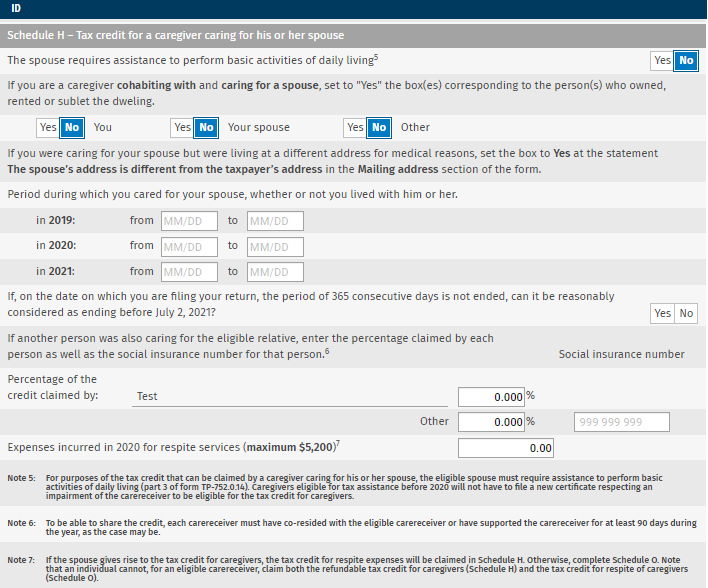
The information required to perform the calculation of the tax credit for a spouse who is an eligible carereceiver must be entered in subsection Schedule H – Tax credit for caregivers in Form Identification of the caregiver.
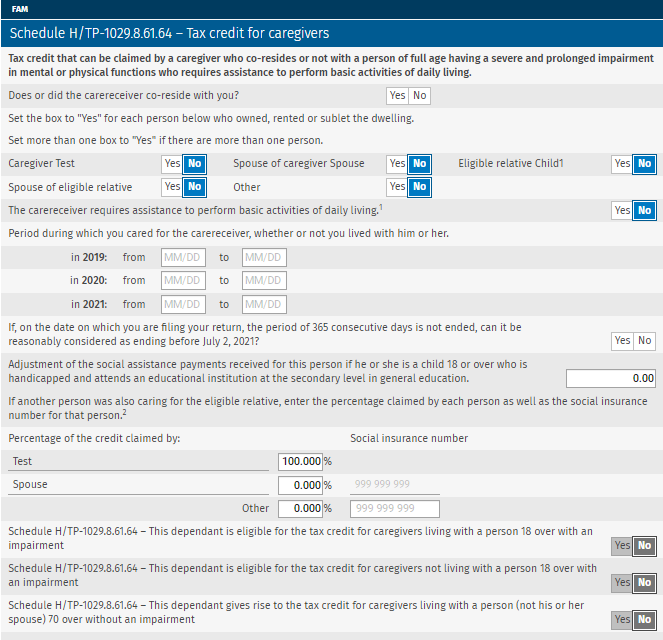
The information relating to a carereceiver who has a relationship with the caregiver must be entered in the Schedule H/TP-1029.8.61.64 – Tax credit for caregivers section of the FAM form.
TP-64.3, General Employment Conditions
Section 3.6 has been added to Form TP-64.3 to enter expenses related to remote work. This section must be completed for employees who incurred expenses solely for remote work performed in the context of the COVID-19-related crisis.
TP-752.PC, Tax Credit for Career Extension
Form TP-752.PC replaces Form TP1 Line 391. Despite this replacement, the calculation of the tax credit for career extension remains unchanged.
TP-1029.9, Tax Credit for Taxi Drivers or Taxi Owners
Tax Credit for Taxi Drivers
The refundable tax credit for holders of a taxi driver’s permit will be eliminated gradually. A taxpayer will then be able to benefit, for 2020, from the refundable tax credit for holders of a taxi driver’s permit, subject to the modifications made to consider the new legal framework governing remunerated passenger transportation by automobile. The level of assistance will be reduced by 50% for 2021 and the tax credit will be eliminated starting in 2022.
For 2020 the condition that the taxpayer is not the holder of a taxi owner’s permit on December 31 in this year is replaced by the condition that the taxpayer is not the holder of a taxi owner’s permit on October 9, 2020.
Tax Credit for Taxi Owners
For the 2020 taxation year, the condition that the taxpayer must be the holder of a taxi driver’s permit in force on December 31 of the taxation year will be replaced by the condition that the taxpayer is the holder of a taxi owner’s permit on October 9, 2020. The other conditions to be satisfied to benefit from the tax credit remain the same.
In addition, to calculate the refundable tax credit, in the situation where the taxation year starts after December 31, 2019, the income taken into account is income earned prior to October 10, 2020.
The refundable tax credit for holders of a taxi driver’s permit will be abolished for a fiscal period or a taxation year that starts after October 9, 2020.
Ontario
ON428 – Ontario Tax
As of January 1, 2020, the rate for the Ontario dividend tax credit for dividends other than eligible dividends has been decreased from 3.2863% to 2.9863%.
In addition, the Ontario apprenticeship training tax credit has been eliminated as of November 14, 2020. As a result, the only expenditures that can be included in the credit calculation are those incurred prior to November 14, 2020, by apprentices who began an apprenticeship program after December 31, 2016, and before November 15, 2017.
British Columbia
BC428, British Columbia Tax
A new 20.5% tax bracket for income over $220,000 has been added for a total of seven brackets.
The British Columbia Charitable Donations Tax Credit has been increased to 20.5% where the taxpayer’s taxable income is over $220,000. The new rate applies to the lesser of the following amounts: the portion of donations in excess of $200 and the portion of taxable income in excess of $220,000. Therefore, a new section has been added to Worksheet BC428.
Alberta
Schedule AB(S11), Provincial Tuition and Education Amounts
Starting in the 2020 tax year, the Alberta tuition and education amounts have been discontinued. Students can continue to claim any unused amounts carried forward from previous years.
AB428 – Alberta tax and credits
The Alberta investors tax credit has been eliminated but unused carry forward amounts can still be claimed.
Manitoba
MB479, Manitoba Credit
A new one-time refundable Manitoba credit, i.e. the Seniors Economic Recovery Credit has been introduced for eligible seniors. This credit can only be claimed in the returns of eligible seniors who have not yet received the May or June 2020 advance payments.
Saskatchewan
SK428, Saskatchewan Tax and Credits
Three new non-refundable tax credits are available for eligible volunteers as of January 1, 2020. These credits are:
- the Volunteer firefighters’ amount;
- the Search and rescue volunteers’ amount; and
- the Volunteer emergency medical first responders' amount.
The tax credits on line 58315, Volunteer firefighters’ amount and line 58316, Search and rescue volunteers’ amount are equal to the federal credits. As for the amount on line 58317, Volunteer emergency medical first responders' amount it is specific to Saskatchewan.
To claim this credit specifically for that province, volunteers must have completed at least 200 hours of eligible volunteer emergency medical services in the year. Recognized volunteers’ services are:
- be on duty and answer corresponding emergency calls;
- assist to meetings organized by the provincial health authority;
- participate in the mandatory training on emergency medical first responders' services.
Yukon
YT428, Yukon Tax
The calculation of the Yukon basic personal amount, the spouse or common-law partner amount and the amount for an eligible dependant has been modified to match the same amounts at the federal level.
YT479, Yukon Credits
The small business investment tax credit has been renamed to business investment tax credit.
The labour-sponsored venture capital corporation tax credit has been discontinued.
Schedule YT 14, Yukon Government Carbon Price Rebate
The undepreciated capital cost (UCC) relating to classes 54 and 55 have been added to the UCC of the classes already eligible for purposes of calculating the Yukon Business Carbon Price Rebate.
The rate for the Yukon Business Carbon Price Rebate increased from 0.345% to 0.69%.
Newfoundland and Labrador
NL428, Newfoundland and Labrador Tax and Credits
Starting in 2020, the eligibility conditions for the volunteer firefighters’ tax credit, the search and rescue volunteers’ tax credit, and the child care tax credit have been modified. Only Newfoundland and Labrador residents are now eligible for these amounts. If you were not a resident of this province on December 31 of the year covered, you cannot claim any of these tax credits.
In addition, the temporary deficit reduction levy has been abolished on December 31, 2019.
Forms Removed
Québec
- TP-1029.RV, RénoVert Tax Credit
- Q1029.RV TPFZ, Keying summary
- QEFILE RV, QC EFILE - Summary of EFILE data fields (TP-1029.RV)
Corrected Calculations
The following problems have been corrected in version 2020 1.0:
Federal
Electronic Filing
Due to its early release date, this version does not allow for electronic filing. The forms related to EFILE are under review in this version.
Information about EFILE
Federal
Important dates
- February 22, 2021 The EFILE On-Line transmission system opened.
- January 21, 2022 The CRA will stop accepting electronically filed T1 returns.
Registration and Renewal On-line
To renew your EFILE privileges for this year’s tax season, you must follow the instructions provided on the "Renewal" page on the CRA Web site at http://www.efile.cra.gc.ca/l-rnwl-eng.html.
To register as a new electronic filer, you must register online by completing the EFILE Registration On-Line form on the CRA Web site at http://www.efile.cra.gc.ca/l-rgstr-eng.html.
You will find more information concerning renewals and new applications at http://www.efile.cra.gc.ca/.
In order to be able to electronically file Form AUTHORIZATION, you must meet the following two criteria:
- Have a valid EFILE number and password; and
- Be a registered representative (online access).
A registered representative is a person who is registered with the CRA’s Represent a Client service. To register with the service, go to http://www.cra.gc.ca/representatives
Québec
Important dates
- February 22, 2021 – The NetFile Québec system opened.
- February 22, 2021 – The Refund Info-line system opened.
- January 21, 2022 – The NetFile Québec system will shut down.
NetFile Québec
- Tax preparers must register for “My Account for professional representatives” (available in French only), a secure space on RQ’s Web site, if they have not already done so in the past.
Note that renewal is automatic for persons who registered for this space in the past. - Consult the page “À qui s'adresse Mon dossier” (available in French only) to see which profile applies to you and what actions you can perform online on behalf of a business or an individual.
Calculations and Forms Not Available or Under Review
Calculations under review
- Early-filed returns (death or pre-bankruptcy) for 2020
- Planner Mode
Forms Not Available or Under Review
The following forms are presently not available or under review for one of the following reasons: either the CRA has not yet released the final version, or we have received the form too late to integrate it.
 Forms Not Available
- Two-dimensional (2D) Bar Code
When printing a federal return (T1) with CCH iFirm Taxprep T1 2020 v.1.0, you will notice that the bar code(s) do not appear. This will not prevent the CRA from processing returns prepared with this version of the program. The option for printing bar codes on federal returns will be available in the next CCH iFirm Taxprep T1 version. - TPF-1.U - Income Tax Return Data
Form TPF-1.U-V with “two-dimensional bar codes” is neither generated nor printed as part of the Québec income tax return (TP1) when using CCH iFirm Taxprep T1 2020 v.1.0 due to the fact that the form had not yet been approved by RQ prior to the release of CCH iFirm Taxprep T1 2020 v.1.0. Note, however, that this will not prevent RQ from processing the return. This feature will be available in the next version.
Forms Under Review
You can access the forms under review from the Form Manager. Although these forms are functional, they have not yet been updated for 2020.
The following form groups are under review:
- Forms relating to electronic filing (including Form T183)
- Forms relating to mining exploration, resources and RS&ED tax credits
- Forms relating to investment tax credits, stock savings plans and venture capital funds
- Forms relating to bankruptcy returns or the returns of taxpayers that are non-residents or that possess foreign property
- Forms relating to foreign tax credits
- Forms relating to the capital gains deduction
- Forms relating to provincial and territorial taxes for multiple jurisdictions situations
- Forms relating to instalments
- Forms relating to business, farming and fishing income and employment expenses
Other specific forms are also under review. They are labelled “Under Review” on screen and “Do not submit” watermark when printing.
Where to Find Help
This version provides the following help resources:
- List of available keyboard shortcuts;
- eHub training videos.
To access the help resources, click the following icon in the top right portion of the screen:

Note that the CCH iFirm Tax T1 e-Bulletin notifies you each time an updated or new form is made available in a program update.
How to Reach Us
Technical and Tax Support Hours
Monday to Friday: 8:30 a.m. to 6:00 p.m. (EST)
Toll Free: 1-800-268-4522
E-mail: csupport@wolterskluwer.com